Best AI Slide Generators for Creating Presentations Faster
Building a presentation still starts the same way for most people. You open PowerPoint or Google Slides, create the first slide, and then spend the next hour figuring out the structure. The content exists somewhere in your head or in scattered notes, but turning it into clear slides takes time.
AI slide generators are changing that process. Instead of starting from a blank slide deck, these tools generate the first version of a presentation from a prompt, document, or topic description. Slide titles, bullet points, and layouts are produced automatically, giving you a structured draft within minutes.
But not all AI presentation makers work the same way. Some focus heavily on visual design, others prioritize structured content generation, and a few tools combine research with slide creation.
In this guide, we will examine some of the most widely used AI slide generators available today.
This blog will cover:
- the best AI slide generators currently available
- how each tool approaches presentation creation
- the strengths and limitations of each platform
- common features found across AI slide generators
- how to choose the right tool for your workflow
By the end of this guide, you should have a clear understanding of which AI slide generator fits your presentation workflow best.
Quick Comparison of Top AI Slide Generators
Each AI slide generator focuses on a slightly different part of the presentation workflow. Some prioritize visual design, others prioritize structured content generation, and some focus on rapid slide creation from prompts.
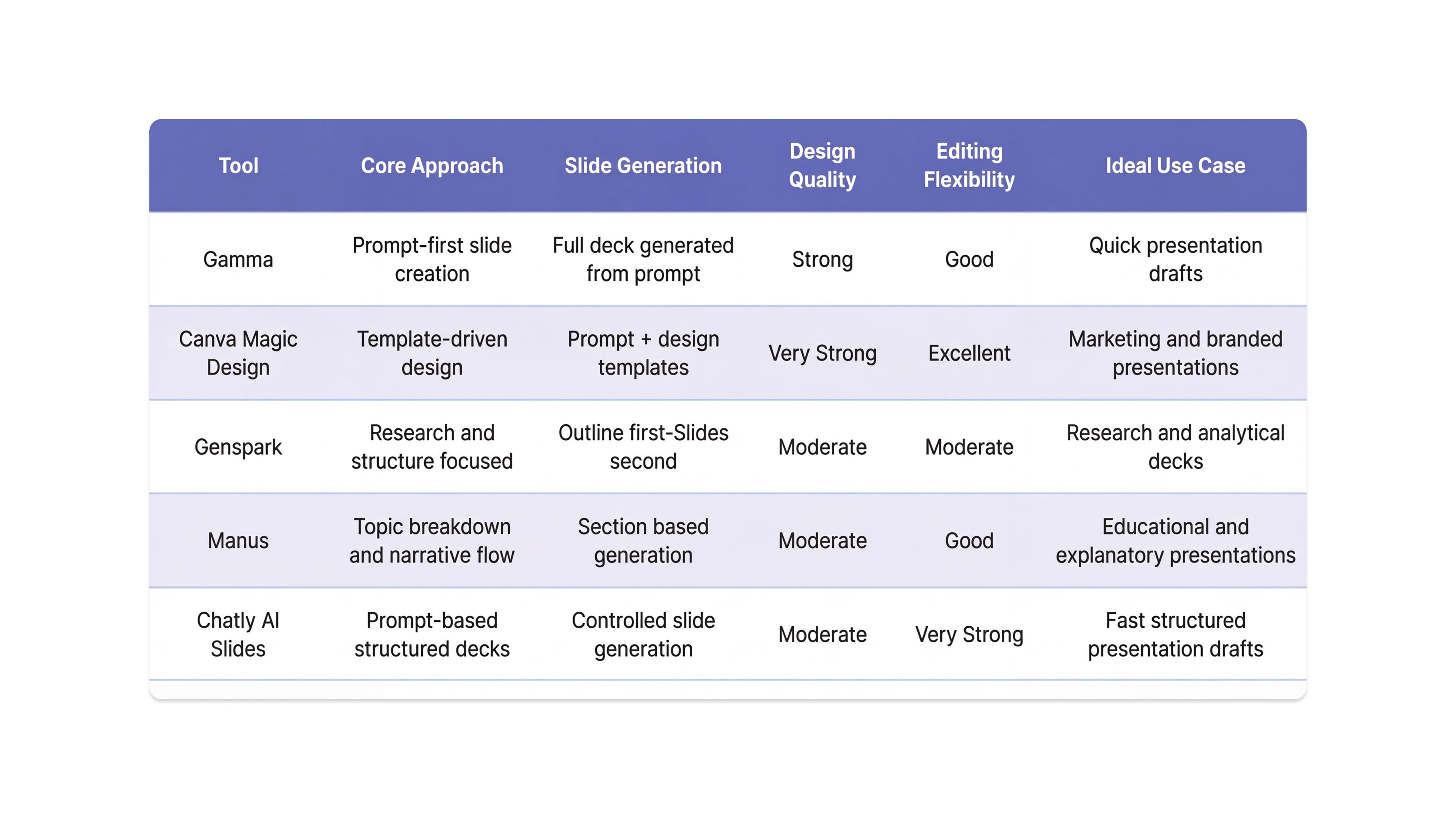
Best AI Slide Generators in 2026 That You Cannot Ignore
AI slide generators follow a simple idea.
You provide a topic, a prompt, or a document, and the tool generates a structured presentation draft. Slide titles, bullet points, and sometimes visuals are created automatically so the user does not have to start from an empty deck.
Technology is mind-blowing, you just need to learn how to use slide generations effectively.
Below are some of the most widely used AI slide generators available today, along with how each one approaches presentation creation.
Gamma – The Benchmark for AI Presentation Makers?
Gamma is an AI presentation tool that generates slide decks directly from prompts, documents, or outlines. Instead of manually creating slides, users describe the topic and Gamma produces a structured presentation with slide titles, bullet points, and layouts.
The tool focuses on speed and visual structure. A presentation draft can usually be generated within seconds after entering a prompt. Users can also paste written content or upload documents and convert them into slides automatically.
How Gamma Generates Presentations
The workflow is simple and prompt driven.
- Enter a presentation topic or prompt.
- Gamma generates a slide outline (that you can edit)
- The system creates slides with titles and bullet points.
- Layouts and visual formatting are applied automatically.
- Slides can be edited or exported.
This process eliminates the need to manually plan slide structures.
Key Capabilities of Gamma AI Presentation Maker
- prompt-to-presentation generation
- document-to-slides conversion
- automatic slide layouts
- built-in presentation themes
- collaborative editing
- export to PowerPoint or PDF
Gamma also uses a card-based layout system that automatically adjusts formatting as content changes.
Best Use Cases AI Slides by Gamma
Gamma works well for:
- marketing presentations
- startup pitch decks
- product overview slides
- internal team presentations
Limitations of Using Gamma
AI-generated slides often require editing. Bullet points may need refinement, and complex presentations with data or analysis typically require additional manual adjustments. Despite this, Gamma remains one of the fastest ways to generate structured presentation drafts from prompts.
Canva Magic Design – Design-First AI Presentations
Canva Magic Design is an AI feature within the Canva platform that generates presentation slides from prompts or text inputs. The tool combines AI-generated content with Canva’s template system, allowing users to create visually structured presentations quickly.
Unlike tools that focus only on content generation, Canva prioritizes presentation design. When a topic is entered, the system generates slide titles and bullet points while automatically applying layouts, fonts, and design themes from Canva’s template library.
How Canva Magic Design Generates AI Slides
The workflow is template-driven with AI assistance.
- Enter a presentation topic or prompt.
- Canva generates a slide outline.
- The system applies a presentation template automatically.
- Slides are populated with bullet points and visual elements.
- Users can edit, rearrange, or export the slides.
This approach ensures the presentation already follows basic design principles.
Key Capabilities of Canva Magic Design
- prompt-to-presentation generation
- automatic template selection
- integrated image and icon library
- drag-and-drop editing
- collaboration and sharing
- export to PowerPoint or PDF
The platform also provides access to Canva’s large design asset library, which simplifies adding visuals to slides.
Best Use Cases of Canva Magic Design for AI Presentations
Canva Magic Design works well for:
- marketing presentations
- brand presentations
- educational slides
- visually driven storytelling decks
Limitations of Canva’s AI Slides Maker
The AI-generated slide content can sometimes be generic and may require editing for clarity or specificity. While design automation is strong, the tool focuses more on visual layout than deep content structuring.
Genspark – The Research-First AI Presentation Builder
Genspark approaches AI slide generation differently from most presentation tools. Instead of prioritizing visual design first, the platform focuses on content structure and topic understanding before generating slides.
When a user enters a topic or prompt, Genspark attempts to break the subject into logical sections. The tool then builds a presentation outline and converts that outline into slides with structured bullet points. This approach often results in presentations that feel more analytical and organized compared to tools that simply generate surface-level bullet points.
For presentations that require explanation, reasoning, or topic breakdown, this structured approach can be more useful than purely design-driven slide generators.
How Genspark Generates AI Presentations
The workflow focuses on content structure before slide creation.
- The user enters a topic or prompt.
- Genspark analyzes the subject and generates a presentation outline.
- Slides are created based on the outline.
- Each slide contains titles and bullet points organized by section.
- Users can then refine the slides or expand sections.
Because the outline is generated first, the presentation usually follows a clearer logical flow.
Key Capabilities of Genspark AI Slides Generator
- prompt-based slide generation
- automatic presentation outlines
- structured bullet point generation
- logical slide sequencing
- editable presentation drafts
Best Use Cases of Genspark AI Presentation Maker
Genspark works particularly well for content-heavy presentations where structure matters more than visuals.
Examples include:
- research presentations
- consulting or strategy decks
- analytical business presentations
- academic presentations
If the goal is to explain a topic clearly rather than impress with design, Genspark’s structure-first approach can be useful.
Limitations of Genspark AI Presentation Designer
The platform is not primarily a design tool. Slides generated by Genspark may look relatively simple compared to tools that emphasize visual templates. Users who care about strong visual polish often export the generated content to another platform for final design adjustments.
Manus – Structured Presentations From Complex Topics
Manus positions itself as an AI system that can convert complex topics into structured presentations. Instead of simply generating slides from a prompt, the platform focuses on breaking down information into logical sections before building the slides.
When a user enters a topic, Manus analyzes the subject and attempts to create a clear flow for the presentation. Slides are then generated with section-based titles and supporting bullet points. This structure-first approach makes the presentation easier to follow, especially for topics that require explanation or layered arguments.
Compared to many AI slide generators that prioritize speed, Manus leans toward clarity and logical sequencing.
How Manus Generates AI Slides
The tool follows a structured workflow.
- The user enters a topic or prompt.
- Manus generates a presentation outline based on the topic.
- The outline is divided into sections.
- Slides are created for each section.
- Bullet points summarize the key ideas.
Because the outline is created first, the presentation usually maintains a consistent narrative across slides.
Key Capabilities of Manus AI Slides Generator
- prompt-based slide generation
- structured presentation outlines
- automatic slide sequencing
- bullet point summarization
- editable slide drafts
The platform is designed to reduce the effort required to organize complex topics into presentation format.
Best Use Cases of AI Presentation Maker
Manus works best for explanatory or analytical presentations. Examples include:
- strategy presentations
- product concept explanations
- educational presentations
- topic breakdowns and explainer decks
When the goal is to communicate ideas clearly rather than design visually impressive slides, Manus can produce more organized results.
Limitations of AI Slide Maker
The platform currently focuses more on content structure than visual design. Generated slides may look basic compared to design-heavy presentation tools. Users who require polished presentation visuals often export the slides to another platform for additional formatting or styling.
Chatly AI Slides – Chat-based, Fast, Controlled Slide Decks With an Editing Loop
Chatly AI Slides is built for a specific workflow: generate a clean presentation draft quickly, then refine it through prompts before exporting. It is not trying to be a design-first template library. It is trying to be a practical slide generator that fits into how people actually work when they are in a rush.
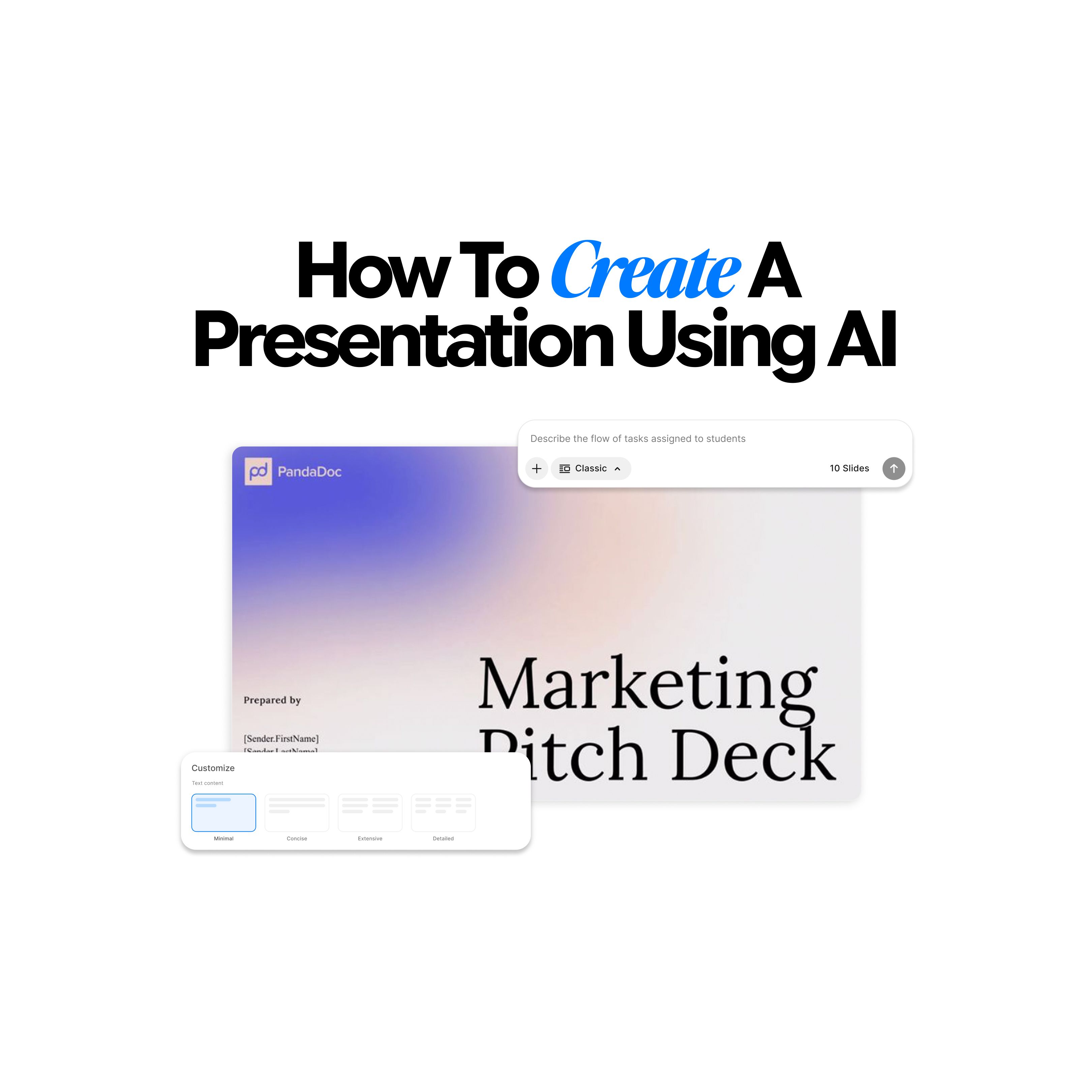
The most important constraint is also its biggest advantage. Chatly currently generates up to 10 slides per request. That forces discipline. Most decks are bloated because people keep adding slides until the story breaks. A hard slide cap pushes you to make a point, not write a novel.
How Chatly AI Slides Can Be Used
The output quality depends heavily on input quality. The tool performs best when you provide complete context in one prompt. Use a prompt that includes:
- the topic
- the audience
- the goal
- the slide count, which should be 10
- the exact sections you want included
- any constraints such as tone, level, or examples
After generation, treat the deck as a draft and run a quick editing loop in Chatly to tighten it before export.
What Chatly’s AI Slides Feature Does Well
Chatly is best at creating slide decks where structure and clarity matter more than visual flair.
- Generates a logical 10-slide outline quickly
- Produces usable slide titles that can be made sharper
- Creates slide bullets that can be edited inside the same workflow
- Supports iterative refinement through simple prompts
- Encourages concise decks because of the slide limit
A practical approach is to ask Chatly to generate the deck, then immediately ask it to shorten bullets, improve titles, and remove any slide that feels redundant before exporting.
Best Use Cases of Chatly’s AI Presentation Maker
Chatly AI Presentation Maker is a strong fit for presentations where you need a clean narrative fast.
- internal meetings and weekly updates
- quick product or feature explainers
- marketing or strategy drafts
- educational mini-decks
- a first version of a longer deck that will later be expanded
If the presentation can be expressed clearly in ten slides, Chatly’s constraint becomes a competitive edge.
Limitations of the AI Slides Feature
The 10-slide limit is real. If you need 20 to 30 slides, you will either generate multiple decks and combine them, or you will compress aggressively and cut content.
The tool is also not design-first. If the goal is a visually branded deck with heavy template control, design-focused platforms will feel more convenient. Chatly’s strength is speed, structure, and editing control, not advanced visual theming.
Practical Guidance for Better Output When Generating Slides with AI
If the first draft feels generic, do not export it. Fix it inside Chatly. Ask for improvements like:
- rewrite slide titles as clear claims
- shorten each bullet to one line
- enforce one idea per slide
- remove fluff and repeat points
- tighten the story so slide order flows naturally
That editing loop is what turns Chatly AI Slides from “fast” into “useful.”
Beautiful.ai – Design-Aware AI Slide Builder
Beautiful.ai takes a different route compared to most AI slide generators. Instead of generating completely free-form slides from prompts, the platform focuses on design automation through intelligent templates.
The idea behind the tool is simple. Most presentations look messy because people spend too much time adjusting layouts manually. Beautiful.ai solves this by using smart slide templates that automatically adjust formatting as content is added or edited.
Rather than forcing users to design slides from scratch, the platform maintains visual consistency by automatically aligning text, resizing elements, and organizing layouts. This reduces the design effort required to produce professional-looking slides.
How Beautiful.ai Generates Presentations
The workflow combines AI assistance with template-based design.
- The user selects a presentation theme or template.
- AI suggestions help generate slide titles and content.
- Smart templates automatically adjust layouts.
- Slides remain visually consistent as content changes.
- Presentations can then be exported or shared.
Instead of focusing purely on prompt-based slide creation, Beautiful.ai ensures slides maintain a clean and structured visual appearance.
Key Capabilities of This AI Slides Generator
- intelligent presentation templates
- automatic layout adjustments
- design consistency across slides
- AI-assisted content suggestions
- collaboration features for teams
- export to PowerPoint or PDF
One of the strongest aspects of the platform is its ability to maintain visual balance automatically. Elements such as charts, images, and bullet points adjust dynamically as slides evolve.
Best Use Cases of Beautiful.ai Slides Maker
Beautiful.ai works particularly well for presentations where visual clarity and professional formatting are critical. Examples include:
- investor presentations
- corporate strategy decks
- client presentations
- internal executive presentations
Teams that want consistent presentation design across multiple decks often find the platform useful.
Limitations of this AI Slide Generator
Beautiful.ai is not primarily a prompt-driven AI slide generator. Users still spend time adding content manually compared to tools that generate full slide decks instantly. While the design automation is strong, the content generation features are more limited than some AI-first presentation tools.
Presentations.AI – Prompt-Driven Slide Generation
Presentations.AI is built specifically to automate the process of turning ideas into presentation decks. Unlike traditional slide tools that rely heavily on templates, the platform focuses on generating complete presentation drafts from prompts or short descriptions.
The goal is simple. Instead of manually planning slide titles and bullet points, users describe the topic and the tool generates a structured presentation automatically. Slides are created with titles, supporting bullet points, and layouts that follow a logical flow.
This makes the platform particularly useful when the objective is to move from idea to presentation draft quickly.
How Presentations.AI Generates Slides
The workflow centers around prompt-based slide creation.
- The user enters a presentation topic or prompt.
- The platform generates a structured outline.
- Slides are created based on the outline.
- Bullet points and slide sections are added automatically.
- Users can edit and customize slides before export.
Because the system generates a complete deck, users typically start with a full presentation draft rather than building slides individually.
Key Capabilities of This AI Presentation Maker
- prompt-based slide generation
- automatic slide outlines
- customizable presentation themes
- AI-assisted content generation
- collaboration and sharing features
- export to PowerPoint or other formats
The platform attempts to combine both content generation and design automation, reducing the time required to produce presentation drafts.
Best Use Cases of AI Presentation Maker
Presentations.AI works well for users who need quick first versions of presentations. Examples include:
- marketing presentations
- internal reports
- product overview slides
- training presentations
Teams that frequently build presentation drafts before refining them manually can benefit from this workflow.
Limitations of This AI Slides Generator
Although the platform generates full presentation drafts, the slides usually require editing to improve clarity or specificity. AI-generated bullet points may feel generic, especially for technical or data-heavy topics. Users often treat the generated presentation as a starting point before refining the content further.
Common Features of AI Slide Generators
Most AI slide generators differ in interface and design philosophy, but they rely on a similar set of core capabilities. These features explain how the tools are able to generate presentations quickly from minimal input. Below are the functions commonly found across most AI presentation platforms.
Prompt-to-Slide Generation
The primary feature is converting a prompt into a structured presentation. Users describe the topic of the presentation and the AI generates:
- slide titles
- supporting bullet points
- basic slide structure
This removes the need to plan the presentation from a blank slide deck.
Automatic Slide Structure
Most tools generate a logical slide sequence automatically. Typical structures include sections such as:
- introduction
- problem or context
- explanation or solution
- examples
- conclusion
This helps maintain a consistent narrative flow across the presentation.
Content Summarization
AI slide generators can convert longer content into slide-ready summaries. Examples include:
- reports
- research notes
- blog articles
- meeting summaries
The AI extracts key ideas and converts them into short bullet points suitable for slides.
Layout and Design Automation
Many platforms apply design formatting automatically. This can include:
- slide layouts
- typography and spacing
- visual alignment
Tools that emphasize design, such as Canva and Beautiful.ai, use templates to maintain visual consistency across slides.
Editing and Export
Most AI presentation tools allow users to edit generated slides before exporting them. Common export formats include:
- PowerPoint
- web presentations
This allows users to refine the generated slides before finalizing the presentation.
Future of AI Slide Generators
AI slide generators today mostly act as draft creators. You give them a topic, and they produce a slide structure with bullet points. Useful, but still basic.
The next phase will move beyond simple slide generation toward full presentation assistance. Instead of only creating slides, these systems will help research, structure, design, and refine the presentation itself. A few shifts are already beginning to appear.
Research-Aware Presentations
Most current tools generate slides based only on prompts. That is why many AI-generated presentations feel generic. Future systems will likely generate slides after analyzing supporting information.
This could include:
- summarizing research sources
- extracting insights from documents
- identifying key data points
- building slides around verified information
The result would be presentations that feel less like summaries and more like structured explanations supported by evidence.
AI-Assisted Storytelling
Strong presentations follow a narrative. They introduce a problem, explain context, present solutions, and close with clear takeaways. Most AI slide tools today generate slides mechanically. They do not always build a persuasive narrative.
Future systems will likely assist with:
- argument structure
- slide sequencing
- narrative flow
- audience-specific messaging
In other words, the AI will help shape the story behind the slides, not just the slides themselves.
Automatic Visual Generation
Visuals often take the most time in presentation design. Creating charts, diagrams, and visual comparisons usually requires separate tools. AI slide generators are moving toward generating visuals automatically based on slide content.
Examples may include:
- charts generated from summarized data
- diagrams explaining processes
- visual comparisons of ideas
- automatically generated infographics
This would allow users to move from idea to fully visualized presentation much faster.
Conversational Presentation Editing
Editing slides manually can still be slow. Future AI tools will likely rely more heavily on conversational editing. Instead of adjusting slides individually, users will simply describe what they want.
For example:
- shorten all slide bullet points
- convert this section into a comparison table
- simplify language for a beginner audience
- add a real-world example to this slide
This kind of interaction turns the AI into a presentation collaborator rather than just a slide generator.
Conclusion
Creating presentations has traditionally been a slow process. Even when the content is clear, converting ideas into structured slides takes time. Users often spend hours planning slide order, summarizing information, and adjusting layouts.
AI slide generators significantly reduce that effort.
Instead of starting with an empty slide deck, users can generate structured presentations from prompts, notes, or documents. Tools such as Gamma, Canva Magic Design, Genspark, Manus, and Chatly AI Slides automate much of the early work involved in building slides.
A few practical observations emerge when comparing these tools.
- Design-focused tools help produce visually polished slides quickly.
- Structure-focused tools are better for analytical or research-heavy presentations.
- Prompt-driven tools are the fastest way to generate presentation drafts.
In practice, most users combine these strengths. AI generates the first version of the presentation, and the user refines the slides to improve clarity, storytelling, and visual impact.
Used correctly, AI slide generators do not replace presentation thinking. They simply remove the repetitive work that used to slow it down. For anyone who regularly builds presentations, these tools can dramatically shorten the path from idea to finished slide deck.