One prompt, one take
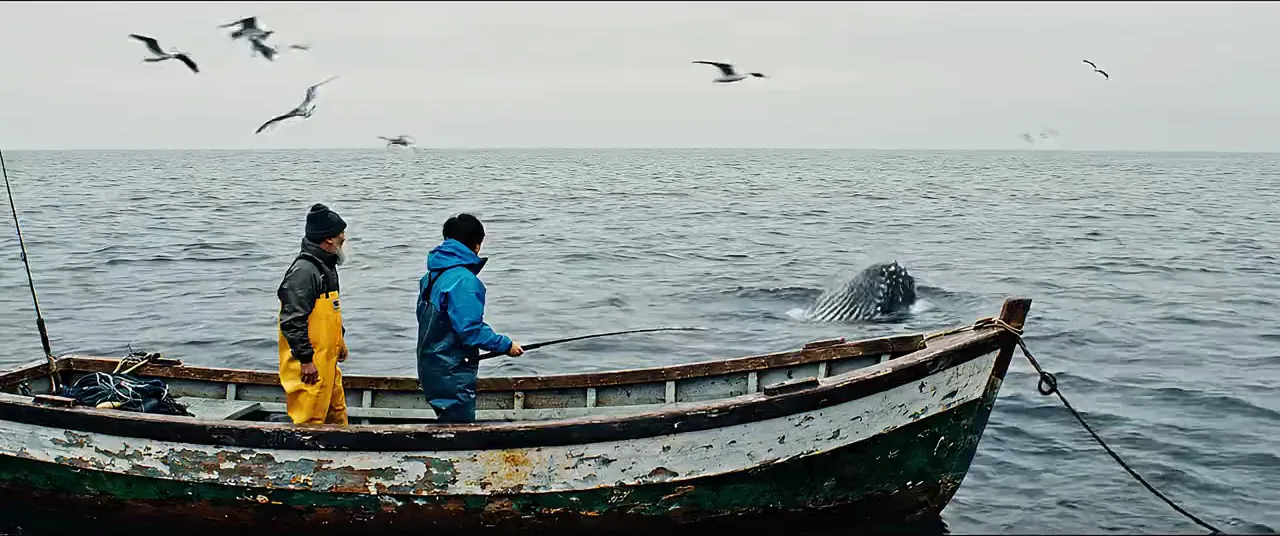
Describe the shotCinematic 35mm film. A humpback whale breaches out of a calm grey ocean beside a small wooden fishing boat, water cascading off its body, two fishermen turning to watch. Wide shot from just above the water. Audio: the huge splash, water rushing back, gulls crying and the men's surprised shouts.
- 1Step 1
Add a reference
- 2Step 2
Write the shot
- 3Step 3
Generate with Veo 3.1
Who it’s for
Talking scenes
A person saying a line on camera, lips in sync, for ads, explainers and social clips without a shoot.
Product shots with sound
The pour, the click, the fizz: product moments that sell on sound as much as on picture.
Short films and previs
Plan a scene shot by shot with pinned first and last frames, then cut the takes into a sequence.
Veo 3.1 at a glance: six things to know
Veo 3.1 is Google's video model. Write the shot and the sound, start from a still, or pin the first and last frames, and it films an eight-second take with dialogue, effects and ambience made in the same pass. In EverAsk it sits beside the other video models, so you can run one prompt on each and keep the best take. The film behind the title comes from EverAsk's own reel, each take named with the model that made it; the takes lower down were made with Veo 3.1.
- Veo 3.1 is Google DeepMind's video model, in EverAsk beside the others
- 8s
- Takes of 4, 6 or 8 seconds, ready to cut together
- 4K
- Up to 4K, for widescreen and vertical
- Sound
- Dialogue, effects and ambience in the same take
- 3 refs
- Start from text, a still, or up to three reference images
- 2 shapes
- Widescreen and vertical, from one prompt

Frequently asked questions
What is Veo 3.1?
Veo 3.1 is Google's video generation model. It makes clips from text, an image or reference images, with dialogue, effects and ambient sound generated in the same pass.
How long is a Veo 3.1 clip?
Each take is 4, 6 or 8 seconds. Sequence several on EverAsk's timeline for a longer video.
What changed from Veo 3?
Veo 3.1 adds first and last frame control, up to three reference images and richer audio, on top of Veo 3's text and image to video.
What resolution does Veo 3.1 make?
720p, 1080p or 4K, in 16:9 or 9:16.
Do I need a Google account to use it?
No. Veo 3.1 runs on your EverAsk plan alongside the other video models, on one bill.
EverAsk on your phone and your Mac
EverAsk for iPhone
Run the same shot on every video model on the train, and pick the winner on your phone. Every clip you make here is on your phone.
Download on the App Store

EverAsk for Mac
Every video model on your desktop, with the stills and footage you already have to hand.
Download for macOS